Are You as Vulnerable as They Say?
Attackers use simple, predictable kill chains to target you. Targeted advertising tries to scare you into thinking it's complicated. Here's what actually protects your data.
Someone close to you has asked some version of this: Do I need a VPN? Is my antivirus good enough? I got a text saying my account was compromised, what do I do?
Maybe that person is you.
These are the right questions. The problem is that the answers being sold to you are calibrated to generate revenue, not to address your actual risk. Every day you encounter a VPN ad warning you about hackers on public Wi-Fi, an antivirus renewal notice implying you are exposed without it, an identity monitoring service quoting breach statistics to drive subscriptions. The products exist on a spectrum from genuinely useful to outright junk, and telling them apart requires understanding something most of the marketing actively obscures: what actually gets people compromised.
The answer is not complicated. It is not sophisticated malware. It is not someone intercepting your coffee shop Wi-Fi. The FBI’s Internet Crime Complaint Center received 859,532 complaints in 2024, reporting $16.6 billion in losses, a 33% increase from the year prior. [FBI IC3 2024 Annual Report] The top complaint category by a significant margin was phishing and spoofing, with 193,407 reports. Personal data breaches came in third at 64,882. Malware, the threat most aggressively marketed against, generated 441 complaints. Ransomware generated 3,156.
The attack surface targeting everyday people is real. It is also narrower and more manageable than the marketing would have you believe.
It is worth acknowledging upfront that there are many ways to get compromised. Clicking a malicious link. Typing your password into a fake login page. Downloading a file from an untrusted source. A USB drive handed to you or found in a parking lot. Physical theft of an unlocked device. These are all real attack vectors. What the data shows, year after year, is that the overwhelming majority of successful attacks against individuals begin with phishing and stolen credentials, not sophisticated technical exploits. The defenses in this article address all of these vectors in some form. Understanding where the actual risk concentrates is what separates a useful security posture from an expensive and anxious one.
What’s Being Marketed to You
Before getting into the attacks themselves, it is worth surveying the landscape of products aimed at everyday consumers. Not because they are all bad, but because understanding what they actually do, and what they don’t, is the foundation for making an informed decision.
Iowa State University cybersecurity researcher Doug Jacobson documented what he calls the “technology vs. user cycle” in research published in January 2025: security product marketing relies on fear, blame, and complexity to convince users they are incapable of managing security independently. [Iowa State Research] The result is not a more secure user. It is an overwhelmed one who either buys products that don’t address their actual risk or disengages from security entirely, becoming more vulnerable in the process.
The products most aggressively marketed to everyday consumers include:
VPN services are among the most heavily promoted through podcast sponsorships, YouTube integrations, and social media advertising. The pitch is that public Wi-Fi puts you at risk of having your traffic intercepted. The product solves a real but narrow problem that most people rarely encounter in the form being advertised.
Antivirus suites are typically sold as all-in-one security bundles packaging browser extensions, identity monitoring, VPN, dark web scanning, and password managers under a single subscription. Some of these add-ons introduce their own privacy risks. Several major antivirus vendors have had documented incidents where their software became the vector for compromise rather than a defense against it.
Identity theft monitoring subscriptions address a legitimate problem. The core capability, checking whether your credentials appeared in a known breach, is available for free. The paid services layer insurance and credit monitoring around it.
Browser security extensions marketed as single-install protection deserve scrutiny. Some do useful work. Others collect your browsing history as part of their business model. Any extension requesting permission to read all data on all websites you visit should be evaluated carefully regardless of its marketing claims.
Credit monitoring subscriptions are useful after a confirmed identity theft event. A free credit freeze at all three bureaus is more protective before the fact and costs nothing.
Dark web monitoring is marketed as a premium capability. Have I Been Pwned does the same thing for free.
None of these are universally useless. The issue is that the threats they are marketed against are often not the threats most likely to affect you, and the defenses that would actually protect you are largely free.
What the Data Says: Common Attack Vectors
The FBI’s 2024 Internet Crime Report, released in April 2025, is the most current government data available on cybercrime affecting individuals in the United States. [FBI IC3 2024 Annual Report] The numbers are worth sitting with before discussing any defense.
By complaint volume, the top categories reported by individuals were:
- Phishing and spoofing: 193,407 complaints
- Extortion: 86,415 complaints
- Personal data breach: 64,882 complaints
- Non-payment/non-delivery: 49,572 complaints
- Tech support fraud: 36,002 complaints
At the bottom of the same list:
- SIM swap: 982 complaints
- Malware: 441 complaints
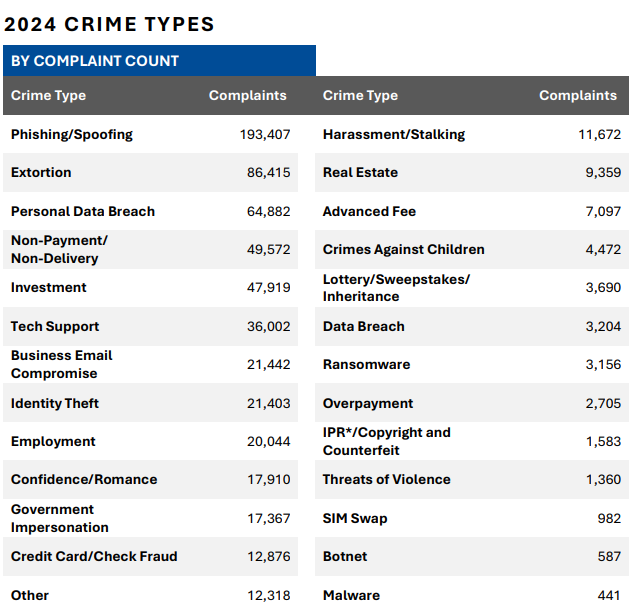 Source: FBI Internet Crime Complaint Center, 2024 Annual Report (released April 2025). [Full Report]
Cyber-enabled fraud, which includes phishing, spoofing, tech support scams, and related social engineering, accounted for 83% of all losses reported to the IC3 in 2024. The attacks winning at scale are not sophisticated technical exploits. They are manipulation delivered through digital channels, at volume, targeting the human layer.
This is not a new finding. It is consistent across every major cybercrime report published in recent years. The Verizon 2025 Data Breach Investigations Report found credential abuse in 22% of breaches and phishing in 16%, with 88% of web application attacks involving stolen credentials. [Verizon DBIR 2025] Stanford researchers attributed 88% of cybersecurity incidents to human error. The pattern is consistent: the human layer is the target, not the technology.
What People Often Worry About
Given the marketing environment, there is a persistent gap between what people fear and what the data says actually happens.
Malware and Viruses
The word “malware” covers a wide range of malicious software, from viruses to spyware to ransomware. It is also the central fear that antivirus marketing has built an industry around. The 2024 IC3 data puts the actual complaint volume at 441 reports out of 859,532 total, less than one tenth of one percent of all complaints filed. [FBI IC3 2024 Annual Report]
Ransomware, often presented as an imminent threat to everyday users, generated 3,156 complaints in 2024, the overwhelming majority against businesses and critical infrastructure, not individuals. Against individual consumers, the risk of traditional malware infection is real but significantly lower than the marketing implies, particularly for users who keep their software updated and are thoughtful about what they download.
Modern operating systems have meaningfully raised the floor of built-in protection. Windows Defender is a legitimate, continuously updated security product. macOS ships with XProtect and Gatekeeper. iOS and Android have security architectures that make traditional malware largely irrelevant on mobile. Your built-in protection, kept current, handles the realistic threat model for most people.
Public Wi-Fi
The threat model used in VPN advertising, someone on the same public Wi-Fi network passively capturing your credentials, is technically possible but significantly overstated as a practical risk in 2026. The vast majority of web traffic now travels over HTTPS, which encrypts data in transit between your device and the destination server. A passive attacker on the same network sees encrypted data, not your passwords. The “hacker at the coffee shop” scenario was a genuine concern when unencrypted HTTP was common. Your browser’s padlock icon is doing real work.
Man-in-the-middle attacks on public Wi-Fi remain theoretically possible in certain configurations, but they are not the primary attack vector documented in the data. For most people doing ordinary tasks on public Wi-Fi, the realistic risk is substantially lower than the advertising communicates.
What You Should Actually Worry About
Passwords: The Unlock to Everything
The most common entry point in the data is not a sophisticated exploit. It is a valid username and password obtained from a breach database, tried against a service where you reused the same credentials.
Billions of username and password combinations from past breaches are available on criminal forums. Attackers run automated tools that try those combinations against active services at scale. This is credential stuffing, and it works because most people reuse the same passwords across multiple accounts. The 2025 Verizon DBIR found that in the median case, only 49% of a user’s passwords across different services were distinct from each other. [Verizon DBIR 2025]
One thing standard password advice consistently misses: changing a password slightly is not meaningful protection. If BlueSky2019! was in a breach, automated tools can generate and test common variations in seconds. BlueSky2020! is not a new password in any functional sense. Protection comes from uniqueness across accounts, not rotation of the same credential.
The defense: A password manager with a unique, randomly generated password for every account eliminates credential stuffing entirely. When one service gets breached, only that credential is exposed. Nothing carries over to your banking, your email, or anything else.
Bitwarden [bitwarden.com] is free, open source, and independently audited. 1Password [1password.com] is excellent if you want something polished and are willing to pay for it. Both actively monitor your stored passwords against known breach databases and flag credentials that have appeared in prior leaks or are being reused. That monitoring is genuinely useful, not a marketing feature.
One critical note: your master password is the single key to everything else you are protecting. Reputable password managers encrypt your vault and do not store your master password on their servers. In the event of a breach on their end, an attacker gets encrypted data. How strong your master password is determines whether it stays protected. Make it long, make it something only you would construct, and do not reuse it anywhere.
The marketing angle to watch: Password managers are aggressively bundled into antivirus suites as a feature to justify the subscription price. The standalone options above are worth evaluating independently. The free options are legitimate.
MFA: Defense in Depth When Passwords Fail
Passwords get leaked. Companies get breached. Credentials get phished. Multi-factor authentication exists because even a correct password is not a sufficient defense on its own. A second factor means a stolen password alone cannot complete a login. The attacker needs something physically in your possession.
The 2024 IC3 report documented 982 SIM swap complaints, where an attacker contacts your carrier, impersonates you, and convinces them to transfer your number to a device they control. [FBI IC3 2024 Annual Report] SIM swapping is the most discussed weakness of text-based MFA, but it is not the only phone-based attack worth understanding. Caller ID spoofing allows anyone to make a call or send a message appearing to come from any number they choose, using cheap VoIP services requiring no technical expertise. SS7 exploitation targets weaknesses in the decades-old signaling infrastructure that routes calls between carriers globally, allowing more sophisticated attackers to intercept messages at the network level. Third-party spoofing services sell caller ID manipulation directly for a small fee with no technical knowledge required. [FCC on Caller ID Spoofing]
The practical takeaway is that your phone number is not proof of identity, and neither is a number displayed on your caller ID. Text-based MFA is still meaningfully better than no MFA. It is just the weakest option available.
Types of MFA, from weakest to strongest:
SMS text codes are the most common and most vulnerable, for the reasons above. Still better than nothing.
Email codes share similar weaknesses if the receiving email account is itself compromised.
Authenticator apps such as Google Authenticator, Authy, or the built-in options in iOS and Android generate time-based codes locally on your device. No carrier is involved. Phone number attacks do not affect them. This is the right default for most people.
Hardware tokens such as a YubiKey are the strongest form available. A physical device you plug in or tap. No code to intercept, no app to compromise remotely. Appropriate for high-value accounts or anyone wanting maximum assurance.
Where to enable MFA, in priority order:
- Email, always first. This is the account that resets every other account you have.
- Banking and financial accounts.
- Social media, especially accounts tied to your identity.
- Government accounts: IRS, Social Security, state portals, anything connected to your identity or benefits.
- Everything else.
The marketing angle to watch: MFA apps and hardware tokens are cheap or free, which is why they are not heavily sold. SMS-based MFA is often the default because it requires no additional product. Upgrading to an authenticator app costs nothing and provides meaningfully stronger protection.
VPN: A Specific Tool for Specific Scenarios
VPNs encrypt traffic between your device and the VPN provider and mask your IP address from the sites you visit. They solve a real problem. The problem is that the scenario used to market them, credential theft over public Wi-Fi, is not where the data says most people actually get compromised.
A VPN does nothing against credential stuffing, phishing, account takeover, or the social engineering attacks that account for the overwhelming majority of complaints in the IC3 data. If your credentials were already in a breach database before you opened your laptop at the airport, no VPN changes that.
When a VPN is the right tool: Sensitive work on networks you do not control. A specific need to mask your activity from your ISP. Travel in countries with restrictive internet policies or active network surveillance.
When it is not the answer: As a substitute for a password manager or MFA. As a general security foundation. As protection against phishing. The threat model in VPN advertising does not match the threat model in the data.
The marketing angle to watch: VPN sponsorships are among the most lucrative in podcast and YouTube advertising. The product is easy to explain, easy to sell, and addresses a fear that is more vivid than the actual risk warrants. Evaluate it against your specific use case, not the ad.
Endpoint Protection: What Your Devices Already Do
The phrase “endpoint protection” covers software designed to detect and prevent malware, ransomware, and other device-level threats. It is a legitimate and important category in enterprise security. For individual consumers, the gap between built-in protection and third-party products is narrower than most marketing communicates.
Windows Defender is a real, continuously updated security product. Independent testing consistently ranks it competitive with paid alternatives. macOS ships with XProtect for malware scanning and Gatekeeper for software verification. iOS and Android have security architectures that make traditional malware transmission largely irrelevant without deliberate user action.
The concern with many third-party antivirus products is not that they fail to detect malware. It is what some of them do alongside that function: browser extensions that redirect searches, data collection practices buried in license agreements, and background processes that have in documented cases introduced their own vulnerabilities. The bundle that includes VPN, identity monitoring, dark web scanning, and a password manager for one monthly fee is designed to create a subscription dependency, not to match your actual threat model.
Free tools worth knowing:
VirusTotal [virustotal.com] allows you to upload a suspicious file or paste a URL and check it against dozens of security scanners simultaneously. Free, no account required.
Google Safe Browsing is built into Chrome, Firefox, and Safari and flags known malicious URLs automatically. You are likely already using it without knowing.
The most consistently underused protection against device-level threats is keeping software current. Enable automatic updates for your operating system and browser at minimum. Your browser is the primary interface between you and every threat on the web. Your phone carries your authenticator app, your banking app, and in many cases your second factor for everything else. A device running outdated software undermines every other defense on this list.
On older devices: manufacturers eventually stop releasing security updates, and newer software versions can sometimes affect performance on aging hardware. If a full system update is not practical, prioritize your browser and authentication apps. If your device no longer receives security patches at all, known vulnerabilities are sitting open on something carrying your most sensitive accounts. Replacing it when budget allows is a legitimate security argument, not just a manufacturer’s sales pitch.
The marketing angle to watch: Antivirus renewal notices are designed to generate urgency. The language, “your protection has expired,” implies you are now exposed. What you are actually missing is a paid subscription layered on top of protection your operating system already provides.
Identity Protection: What’s Free vs. What’s Sold
Identity theft generated 21,403 complaints to the IC3 in 2024 with $174 million in reported losses. [FBI IC3 2024 Annual Report] The monitoring services that promise to alert you when your information appears on the dark web are addressing a real problem. What most people do not know is that the core capability is available for free.
Have I Been Pwned [haveibeenpwned.com] is a free service maintained by security researcher Troy Hunt that aggregates data from known breach events and tells you whether your email address appeared in any of them. Free notifications alert you when a new breach includes your address. This is the core function paid dark web monitoring services charge for monthly.
A credit freeze is more protective than monitoring and also free. Placing a freeze at all three bureaus, Equifax, Experian, and TransUnion, prevents new credit from being opened in your name without your explicit action to temporarily lift it. It stops new-account fraud before it happens rather than notifying you after. AnnualCreditReport.com [annualcreditreport.com] is the federally mandated free service giving you access to your full reports from all three bureaus.
Paid identity monitoring services add insurance products and broader monitoring around these free capabilities. If you have experienced identity theft before, or have specific reason to believe your information is actively being misused, those additions may have value. For most people, the free stack covers the realistic risk without a subscription.
The marketing angle to watch: Identity monitoring is often bundled into antivirus suites and sold as a premium feature. The free version of the core capability has existed for years. The paid additions are worth evaluating on their own merits, not as part of a bundle designed to justify a monthly fee.
The End User Defense Chain
Each section above describes an attack and a corresponding defense. Taken together they form a chain. An attacker has to move through a sequence of steps to reach their objective. Break any link and the chain fails.
Password manager with unique passwords eliminates credential stuffing. A breach at one service exposes one credential. Nothing carries over to your banking, your email, or anything else.
MFA on email protects the master key. Every password reset for every account you have routes through your inbox. Protecting it with a second factor means a stolen password alone cannot unlock everything downstream.
MFA on financial and government accounts means that even if your credentials are exposed, login requires your physical device. The attacker needs more than what they bought from a forum.
The pause habit breaks phishing. Urgency is the mechanism every phishing attempt relies on. When a message demands immediate action and asks you to click a link, close it and navigate directly to the service yourself. You cannot be phished by a link you never clicked.
Updated browser and devices close the gap between known vulnerabilities and your software. Most device-level infections exploit patches that exist but have not been applied.
Free monitoring and a credit freeze reduce the impact of credential exposure before it runs the chain. Knowing your email appeared in a breach gives you time to act. A credit freeze stops new-account fraud entirely.
The chain is short. Breaking it does not require a suite of subscriptions or a background in security.
If You Do Nothing Else
- Get a password manager and use it for every account. Bitwarden [bitwarden.com] is free. 1Password [1password.com] is excellent if you want to pay. Unique, randomly generated passwords for every account.
- Enable MFA on your email with an authenticator app. This protects the account that resets everything else.
- Enable MFA on banking, financial, and government accounts.
- Build the habit of not acting on urgency in messages. Close it. Navigate directly. Log in independently.
- Keep your browser and phone updated.
- Check Have I Been Pwned [haveibeenpwned.com] and freeze your credit at all three bureaus. Both are free.
The daily attack surface targeting everyday people is narrower than the advertising suggests. The chain is predictable. Breaking it is manageable. Most of the tools that actually matter cost nothing.
Sources: FBI Internet Crime Complaint Center 2024 Annual Report (released April 2025) [ic3.gov] · Verizon 2025 Data Breach Investigations Report [verizon.com] · Iowa State University, Doug Jacobson, “Selling Fear” (January 2025) [iastate.edu] · FCC on Caller ID Spoofing [fcc.gov] · Have I Been Pwned [haveibeenpwned.com] · AnnualCreditReport.com [annualcreditreport.com]